DRONE DUEL
🚁 Overview
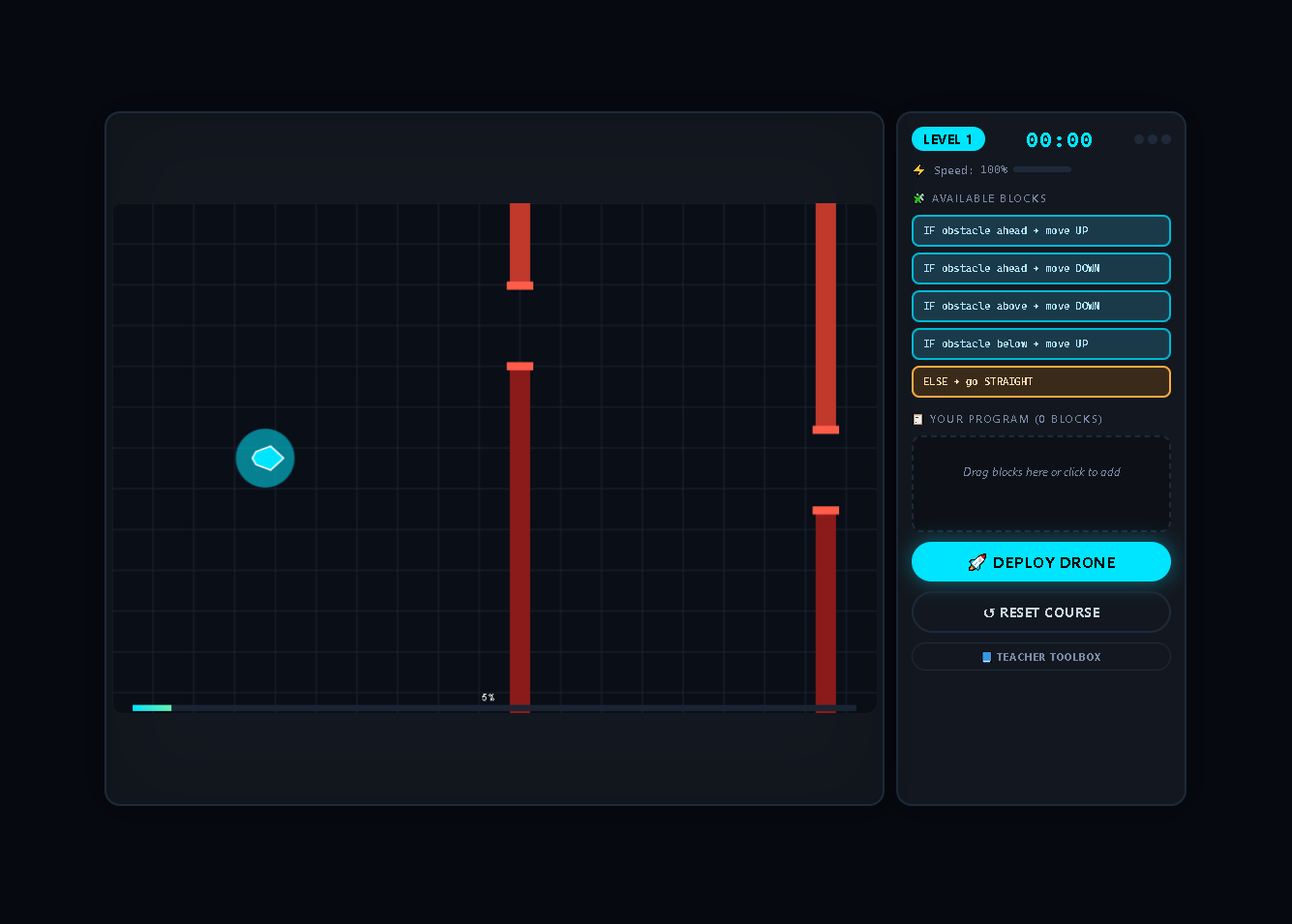
Drone Duel is an educational programming game where you build a sequence of conditional instructions to guide a drone through increasingly complex obstacle courses. Drag and drop logical blocks, deploy your drone, and watch as it navigates real-time challenges using your code. The faster and more efficient your program, the quicker your drone flies!
🎮 How to Play
🧩 Build Your Program
- Drag blocks from the palette into your program area
- Arrange blocks in logical order (top to bottom execution)
- Remove blocks by clicking the ✕ button
- Maximum 10 blocks — choose wisely!
🚀 Deploy Your Drone
- Click "Deploy Drone" to launch
- Your drone executes your program, moving up/down to avoid obstacles
- Speed decreases with more blocks — efficient code = faster drone
- Reach the finish line within 60 seconds to win!
🧠 Logic Blocks
| Block | Type | Behavior |
|---|---|---|
| IF obstacle ahead → move UP | Condition | Detects obstacle directly ahead, moves up |
| IF obstacle ahead → move DOWN | Condition | Detects obstacle directly ahead, moves down |
| IF obstacle above → move DOWN | Condition | Detects obstacle above the gap, moves down |
| IF obstacle below → move UP | Condition | Detects obstacle below the gap, moves up |
| ELSE → go STRAIGHT | Default | Executes when no conditions are met |
🎯 Game Mechanics
Speed System
- Base Speed: 100%
- Speed Penalty: -16% per block in your program
- Minimum Speed: ~22% (with 10 blocks)
- Efficient programs = faster drones = better scores!
Obstacles
- Static obstacles — Fixed gaps to navigate
- Moving obstacles — Gaps that shift up and down (Level 2+)
- Dynamic spawns — New obstacles appear mid-flight (Level 2+)
Drone Features
- Up to 2 drones in Level 3 (dual programming!)
- Crash recovery — 3 lives per level
- Real-time decision making — Your code evaluates every frame
Timing
- 60-second time limit per level
- Timer pauses during crashes and respawns
- Complete levels faster for better scores
🏆 Levels
| Level | Obstacles | Moving | Drones | Challenge |
|---|---|---|---|---|
| 1 | 8 static | No | 1 | Introduction to logic |
| 2 | 9 + 2 dynamic | Yes (some) | 1 | Moving obstacles + dynamic spawns |
| 3 | 10 + 2 dynamic | Yes (mixed) | 2 | Dual drones, complex patterns |
📊 Scoring & Feedback
Real-time HUD
- Timer — Counts up to 60 seconds
- Speed Meter — Shows current drone speed
- Crash Indicator — 3 dots show remaining lives
- Progress Bar — Tracks distance to finish line
Visual Feedback
- Warning glow — Obstacles flash before spawning
- Particles — Crashes create explosion effects
- Drone glow — Visual aura around active drones
- Finish line — Green flag at course end
📚 Teacher Toolbox
💬 Discussion Questions
- Why is adaptability more important than a long script? — The course changes mid-flight; a rigid long program can't handle new obstacles. Short, adaptable code responds to real-time conditions.
- How do real-time systems work? — Like this game, real systems (drones, robots, self-driving cars) must process sensor data and adjust actions continuously.
- What's the trade-off between more blocks and speed? — More blocks = heavier processing = slower drone. Efficient code is fast code.
🔧 Debug Activity
- Load the "Faulty Program" from the Teacher Toolbox
- Remove unnecessary blocks to improve speed
- Observe how code optimization affects performance
💡 Strategies
Beginner Tips
- Start simple — Use just 2-3 blocks
- Use ELSE to handle fallback cases
- Test incrementally — Add blocks one at a time
Advanced Techniques
- Combine conditions — Multiple IF blocks for different scenarios
- Prioritize actions — Place most likely conditions first
- Optimize code — Remove redundant blocks to increase speed
- Dual drone management (Level 3) — Program applies to both!
Common Pitfalls
- ❌ Too many blocks → Slow drone
- ❌ Missing ELSE → Drone freezes when no condition met
- ❌ Wrong condition order → Ineffective responses
- ❌ Overcomplicating simple obstacles → Wasted blocks
✨ Features
- Drag-and-drop programming — No typing required!
- Real-time execution — See your code in action instantly
- Dynamic obstacles — Courses change mid-flight
- Speed-based scoring — Faster = better
- Dual drone mode — Program two drones simultaneously
- Crash recovery — 3 lives per level
- Teacher Toolbox — Built-in educational resources
- Debug mode — Load faulty programs for analysis
- Responsive design — Works on desktop and tablet
- Visual feedback — Particles, glow effects, progress tracking
🎮 Controls
| Action | Input |
|---|---|
| Add block | Drag from palette or click block |
| Remove block | Click ✕ on block in program |
| Deploy drone | Click "Deploy Drone" |
| Reset course | Click "Reset Course" |
| Open Toolbox | Click "Teacher Toolbox" |
| Close Toolbox | Click ✕ or outside modal |
🔧 Technical Details
- Pure HTML/CSS/JavaScript — No external dependencies
- Real-time game loop with delta time
- Canvas rendering with particle effects
- Drag and drop API for block programming
- Responsive layout with ResizeObserver
- State management for each level
🏫 Educational Value
Computer Science Concepts
- Conditional logic — IF/ELSE statements
- Program execution — Sequential processing
- Real-time systems — Continuous sensor evaluation
- Code optimization — Efficiency vs. readability
- Algorithm design — Problem-solving strategies
Critical Thinking Skills
- Pattern recognition — Identifying obstacle types
- Logical reasoning — Predicting program behavior
- Debugging — Finding and fixing errors
- System design — Balancing trade-offs
Download
Leave a comment
Log in with itch.io to leave a comment.