DATA DRAIN — Memory Hierarchy Game
⚡ Overview
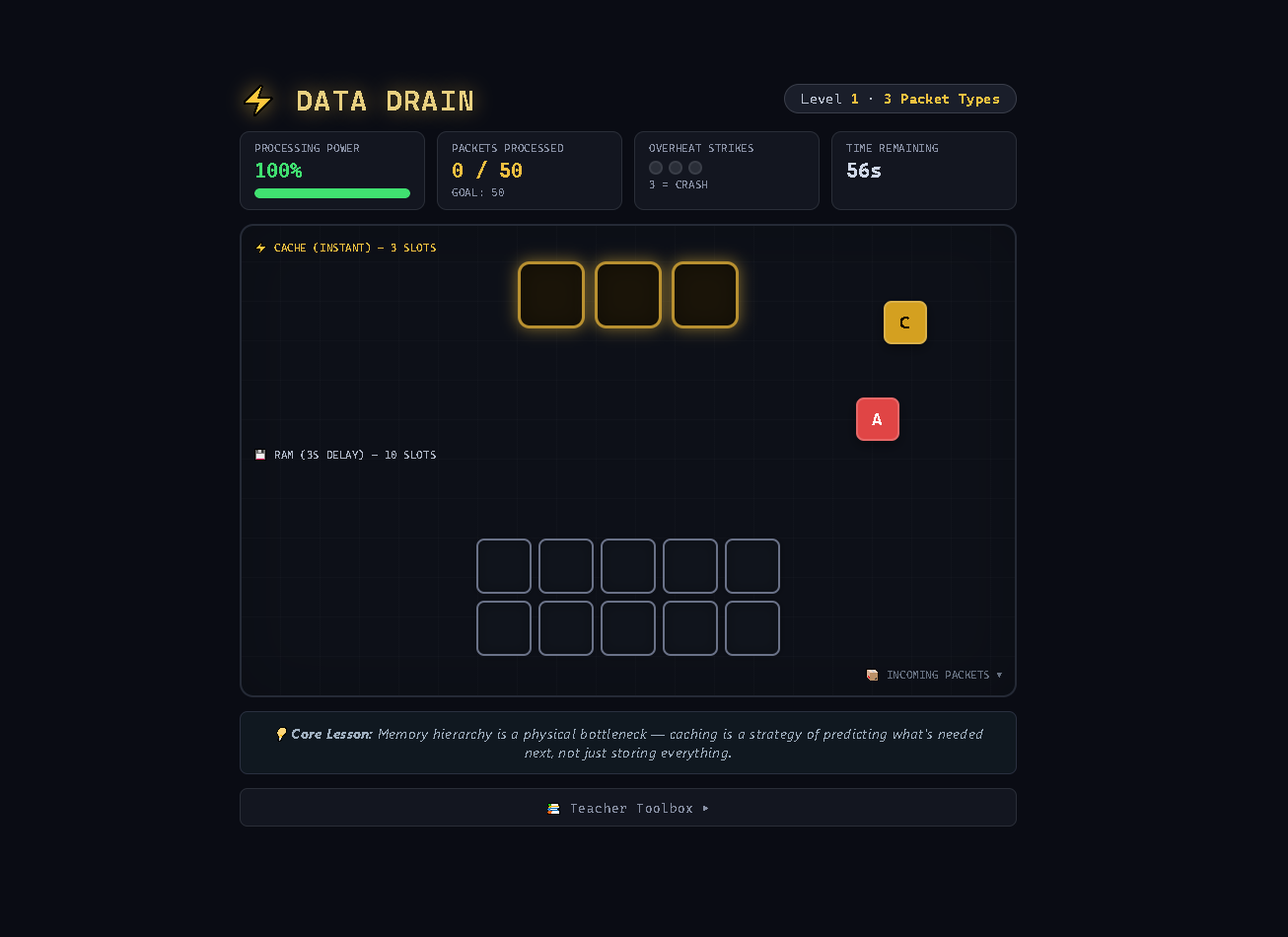
DATA DRAIN is an educational game that simulates how computer memory hierarchies work. You manage incoming data packets, deciding whether to place them in Cache (fast, instant processing) or RAM (slower, delayed processing). Balance your processing power, avoid overheating, and process 50 packets to optimize the server!
🎮 How to Play
🧠 The Core Concept
- Cache = Small, fast, expensive memory (3 slots)
- RAM = Larger, slower, cheaper memory (10 slots)
- Cache Hit = Packet processed instantly ✅
- Cache Miss = Packet must wait in RAM (3 seconds) ⏳
🖱️ Gameplay
- Packets fall from the top — drag them into slots
- Cache slots process packets instantly with a green flash
- RAM slots process packets after a 3-second delay (spinner animation)
- Drag packets between slots to optimize placement
- Each move costs Processing Power — manage your energy!
📊 Memory Hierarchy Explained
| Feature | Cache | RAM |
|---|---|---|
| Speed | ⚡ Instant | ⏳ 3 seconds |
| Capacity | 3 slots | 10 slots |
| Cost | Processing Power | Time |
| Visual | Gold glow | Silver glow |
🎯 Goal
Process 50 packets before time runs out or the server crashes!
🔥 Critical Systems
Processing Power
- Starts at 100%
- Each drag movement costs 8%
- Regenerates slowly over time
- Low power (<35%) = yellow warning
- Critical power (<15%) = red danger
Overheat Strikes
- RAM fills up → Overheat Warning (4-second timer)
- Keep RAM ≤ 8 slots to avoid overheating
- 3 Overheat Strikes = Server Crash 💥
- Overheat Strike = Emergency eviction of ~35% of RAM
Time Pressure
- 60 seconds per level
- Level 2: 6 packet types + LRU bonus
- Level 3: Burst mode (multiple packets at once)
🏆 Level Progression
| Level | Types | Spawn Mode | Special Mechanic |
|---|---|---|---|
| 1 | 3 types | Single packets | Basic memory hierarchy |
| 2 | 6 types | Single packets (faster) | LRU Bonus — repeating types regen power |
| 3 | 6 types | Burst Mode (2-4 packets) | Prepare for bursts! |
💡 Strategies
Beginner Tips
- Cache is your friend — place frequently appearing types in cache
- Keep RAM under 8 slots — avoid overheat warnings
- Process packets quickly — don't let them pile up
- Monitor your power — don't waste moves
Advanced Tactics
- LRU bonus (Level 2+) — Keep recently used types in cache for power regen
- Burst prep (Level 3) — Keep cache slots ready for incoming bursts
- Swap strategically — Moving between Cache and RAM costs more power than within same level
- Emergency eviction — If overheating, manually move packets to cache or let them fall (risky!)
🔧 Interactions
| Action | Input |
|---|---|
| Drag packet | Click and drag to slot |
| Swap packets | Drag onto occupied slot (swaps positions) |
| Return packet to fall | Drag outside any slot |
| Pause | Press P |
| Restart | Press Ctrl+R |
📈 Visual Feedback
- Green flash = Cache hit (instant process)
- Spinning border = Packet processing in RAM
- Gold glow = Cache slots (high priority)
- Silver glow = RAM slots (bulk storage)
- Red pulsing = Overheat warning / danger
- Processing pop = "✓" animation on successful process
📚 Teacher Toolbox
💬 Discussion Questions
- Why do computers have multiple memory levels?
- How does caching affect your phone's speed?
- What happens when cache is too small? Too large?
- How do real-time systems manage memory?
🎴 Classroom Activity
Simulate an LRU Cache with Playing Cards:
- Deal 10 cards face down (RAM)
- Pick 3 to flip face up (Cache)
- When you need a card, check if it's face up (cache hit)
- If not, flip a face-up card down and flip the needed card up (cache miss)
- <span <the="" <="" span="">least recently used>span class=""> card gets evicted — just like a real CPU cache!</span>
🔑 Core Lesson
Memory hierarchy is a physical bottleneck — caching is a strategy of predicting what's needed next, not just storing everything.
✨ Features
- Real-time packet simulation with falling animations
- Drag-and-drop memory management
- 3 difficulty levels with increasing complexity
- Processing power system with regeneration
- Overheat mechanics with strikes and emergency eviction
- LRU bonus system (Level 2+)
- Burst mode (Level 3)
- Teacher Toolbox with discussion and activity prompts
- Visual feedback — flashes, spins, glows, particles
- Responsive design — works on desktop and tablet
- Keyboard shortcuts — Pause and restart
🎮 Controls
| Action | Input |
|---|---|
| Drag packet | Click and drag |
| Place in slot | Release over slot |
| Swap packets | Drag onto occupied slot |
| Cancel drag | Release outside slot |
| Pause/Resume | <td <p="">span class=""> key </td>|
| Restart | Ctrl+R |
🔧 Technical Details
- Pure HTML/CSS/JavaScript — No dependencies
- Canvas-free — DOM-based rendering with CSS animations
- Pointer events — Drag with mouse or touch
- Real-time game loop with requestAnimationFrame
- Responsive design with dynamic layout
🏫 Educational Value
Computer Science Concepts
- Memory hierarchy — Cache vs. RAM vs. storage
- Cache hits vs. misses — Performance implications
- LRU (Least Recently Used) — Cache eviction policy
- Temporal locality — Recently used data is likely needed again
- Resource management — Processing power and capacity
- Real-time systems — Time-sensitive processing
Critical Thinking Skills
- Pattern recognition — Identify frequently occurring types
- Resource allocation — Limited cache space, processing power
- Risk assessment — Overheat avoidance
- Strategic planning — Burst preparation
Download
Leave a comment
Log in with itch.io to leave a comment.