∑ CALCULUS – Ultimate Physics & Math Engine
A downloadable tool
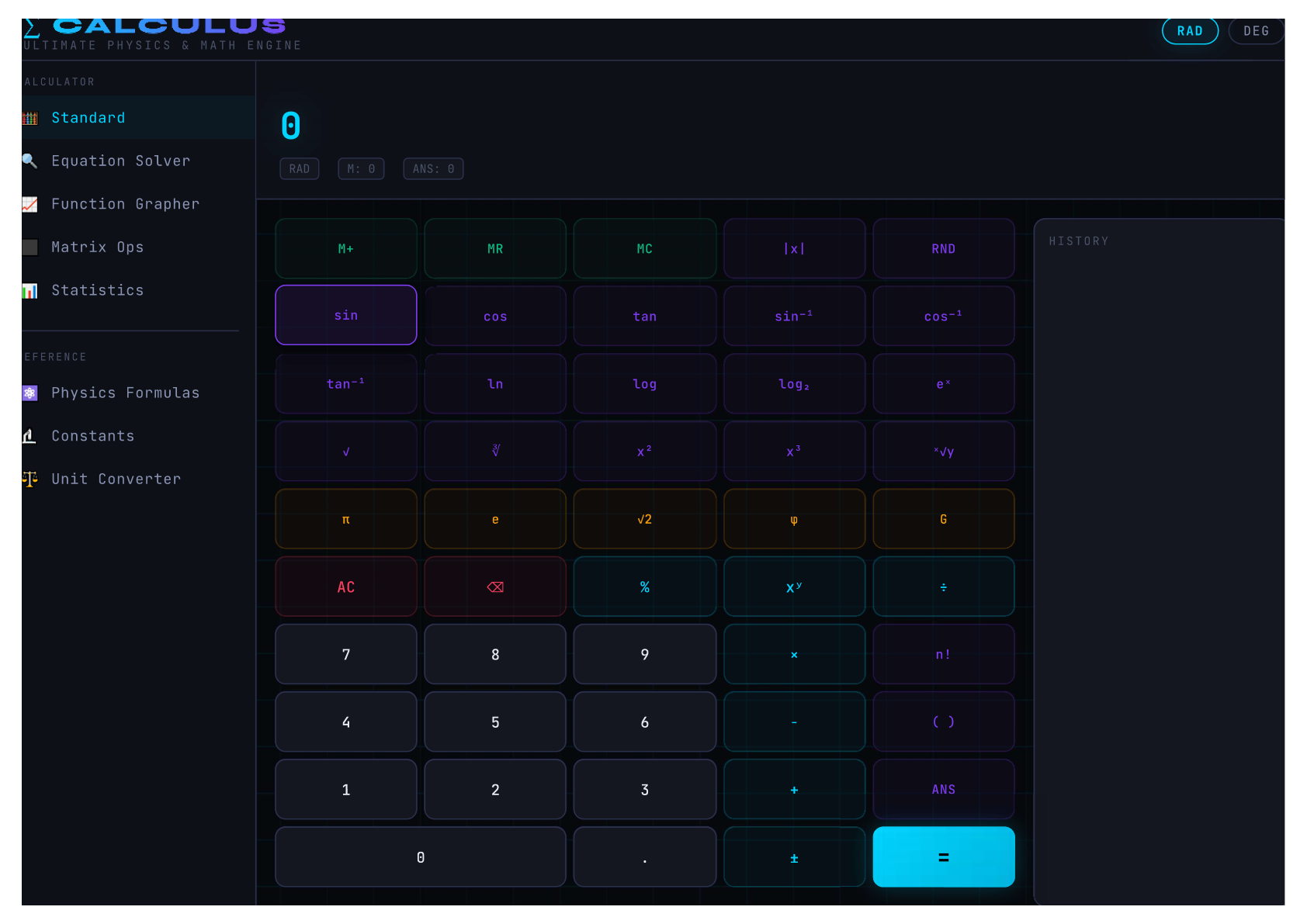
🧮 ∑ CALCULUS is not just a calculator – it's a full‑fledged scientific computing environment designed for students, engineers, physicists, and math enthusiasts. Whether you need to solve a quadratic equation, plot a complex function, compute matrix determinants, analyse statistical data, or look up physical constants, this tool has you covered – all in one sleek, dark‑themed interface.
Built with a powerful expression engine that supports trig functions (in RAD or DEG mode), logarithms, factorials, constants (π, e, φ, G, and more), and even custom memory (M+ / MR), the standard calculator alone is a beast. But that's just the beginning.
Switch between seven powerful panels:
- 🧮 Standard Calculator – full scientific functionality with history and memory.
- 🔍 Equation Solver – find real roots of any equation numerically (bisection method).
- 📈 Function Grapher – plot multiple functions simultaneously with custom ranges.
- ⬛ Matrix Operations – add, subtract, multiply, transpose, invert, find determinants, trace, and norm.
- 📊 Descriptive Statistics – compute mean, median, std dev, variance, quartiles, skewness, and more from a dataset.
- ⚛️ Physics Formulas – browse 30+ essential formulas from mechanics, electromagnetism, thermodynamics, mathematics, and quantum physics – click any to use it in the solver.
- 🔬 Physical Constants – 24 constants at your fingertips; click to insert into calculations.
- ⚖️ Unit Converter – convert length, mass, temperature, time, energy, pressure, speed, and angle.
Everything is client‑side – no data is sent anywhere. Your calculations, graphs, and matrix data stay in your browser.
✨ Features:
- 🧮 Full scientific calculator – trig (sin, cos, tan, asin, acos, atan), log (ln, log, log₂), exp, sqrt, cbrt, factorial, powers, constants, and more.
- 📐 RAD / DEG mode toggle – work in radians or degrees for all trig functions.
- 🔍 Equation solver – numerically finds real roots of any equation (e.g.,
x² - 5x + 6 = 0). - 📈 Function grapher – plot up to 6 functions on the same canvas with custom x/y ranges; supports sin, cos, tan, sqrt, exp, log, and more.
- ⬛ Matrix operations – full support for 2D matrices (up to 6×6): addition, subtraction, multiplication, transpose, determinant, trace, inverse, and norm.
- 📊 Statistics – compute mean, median, standard deviation, variance, min, max, range, IQR, quartiles, skewness, geometric mean, harmonic mean, and coefficient of variation.
- ⚛️ Physics formula library – 30+ formulas with descriptions and variables; click to insert into the solver.
- 🔬 Physical constants – 24 constants (c, h, ℏ, G, e, mₑ, mₚ, Nₐ, kB, R, σ, ε₀, μ₀, π, e, φ, and more) – click to use.
- ⚖️ Unit converter – convert between 50+ units across 8 categories (length, mass, temperature, time, energy, pressure, speed, angle).
- 📜 Calculation history – your last 20 calculations are stored for quick recall.
- 🎨 Dark, cyber‑inspired UI – easy on the eyes, perfect for late‑night study sessions.
- ⌨️ Keyboard support – use your keyboard in the calculator panel (numbers, operators, Enter, Backspace, Esc).
- 💾 No dependencies – everything runs locally; no internet needed after first load.
📦 How to use:
- Open the app – you're greeted with the standard calculator panel.
- Use the calculator – click buttons or type with your keyboard. Use
ANSto recall the last result,M+/MR/MCfor memory. - Switch modes – click RAD or DEG in the header to change trig mode.
- Explore other panels – use the sidebar to switch between:
- Equation Solver – type an equation with
x(e.g.,x**2 - 5*x + 6 = 0) and click SOLVE. - Function Grapher – enter a function (e.g.,
sin(x),x**2,exp(-x**2)) and click Plot. Adjust ranges and redraw. - Matrix Ops – resize matrices (up to 6×6), enter values, and run operations.
- Statistics – paste or type numbers (comma or space separated) and see stats update live.
- Physics Formulas – browse formulas, click one to use it in the solver.
- Constants – click any constant to insert it into the calculator.
- Unit Converter – enter a value, select from/to units, and convert instantly.
- Equation Solver – type an equation with
- Use physics solvers – in the solver panel, click any quick solver (e.g., "Kinematics", "Ohm's Law") to get a dedicated input form.
- Graph multiple functions – keep adding functions; they're plotted together with different colours.
💡 Perfect for:
- Students – from high school to university (physics, math, engineering).
- Teachers and educators – demonstrate formulas and graphs interactively.
- Engineers and scientists – quick calculations on the go.
- Developers – studying or building scientific web applications.
- Anyone who needs a powerful, offline‑capable scientific tool.
- also feel free to make it beter its open sorce
Download
Leave a comment
Log in with itch.io to leave a comment.